
Turn an email into real impact.
Open 1ClickImpact while you write, and in one click fund trees, ocean cleanup, carbon capture, coral restoration or a donation, credited to the person you're emailing. A line with their impact certificate can be added to your draft.
- Reads only your recipients
- Free add-on
- No API key to set up
 Plant treesfrom $0.40 a tree
 Clean oceansfrom $0.60 a lb
 Capture carbonfrom $0.40 a lb
 Restore coralfrom $2.20 a fragment
 Donate to a causefrom $0.10 per $1
Per unit, billed through your own 1ClickImpact account. See full pricing.
How it works
Two entry points: the side panel is where you set things up, and the compose window is where impact is added.
 1
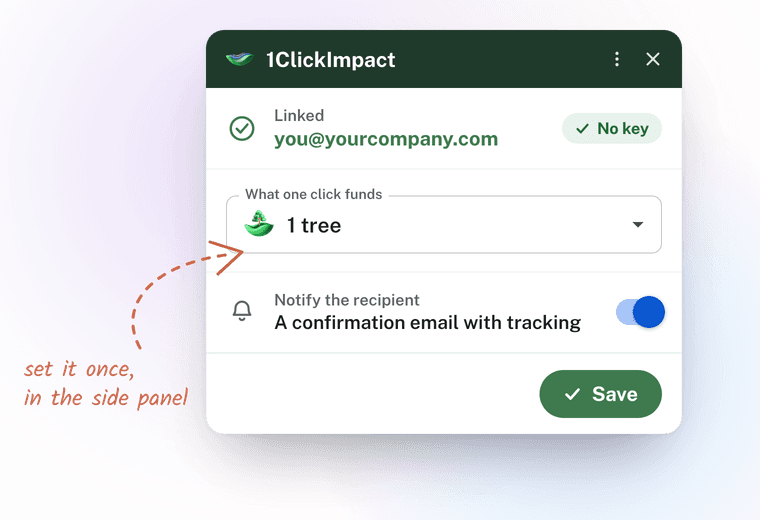
1Set it up once, in the side panel
Open 1ClickImpact from Gmail's right-hand side panel. It finds your 1ClickImpact account from your Google address. Choose what a single click funds (trees, ocean cleanup, carbon capture, coral restoration or a donation) and decide whether the recipient gets a confirmation email.
 2
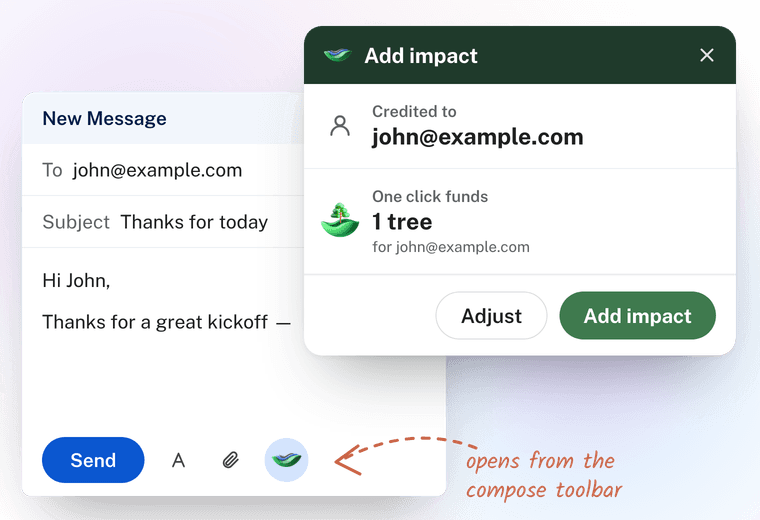
2Open it while you write
Composing an email? Open 1ClickImpact from the bottom of the compose window. It shows who will be credited, the person you're writing to, and lets you change the impact and amount just for this email.
 3
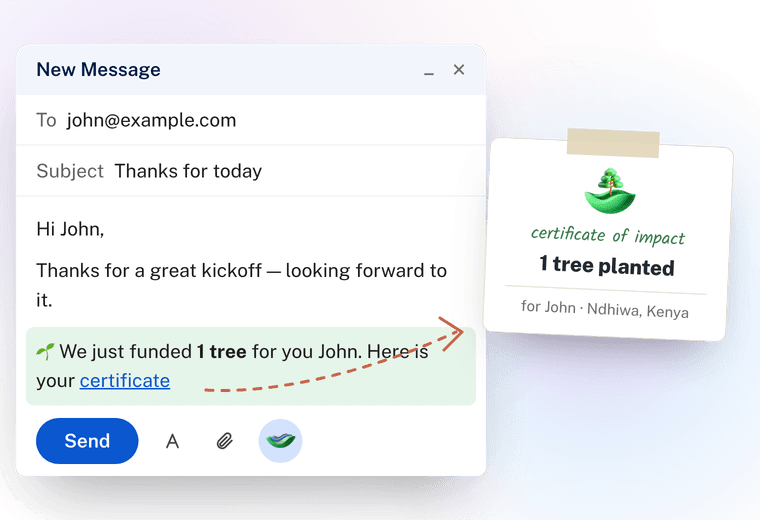
3One click, real impact
Press Add impact and the impact is funded and credited to your recipient. Optionally, one line is written into your draft, for example “🌱 We just funded 5 trees for you. Here is your impact certificate”, linking to the certificate.
What your recipient gets
The impact is credited to them, not to you. So the certificate carries their name, and they can follow it all the way to the ground.



- Impact initiatedGmail · one click
- Donation receivedReceipt sent
- Transferred to the project partnerTrees for the Future · Homa Bay 20
- Impact completedPhotosGPSCertificate
Nothing to copy, nothing to paste
The add-on knows which Google address you are signed in to Gmail with, and finds your 1ClickImpact account from it. If there is one, it says so and you are ready; if there is not, it tells you which address to sign up with. There is no key to fetch, and nothing to keep safe.
Your choices — what one click funds, how much, and the line it writes — are stored with your account rather than in the browser, so they follow you to any device.
What you need
- A Gmail or Google Workspace account, with the add-on installed.
- A 1ClickImpact account on that same email address, with an active plan. See plans.
- That is it. The add-on itself is free — you pay only for the impact you fund.
Running in a few minutes
Install it, sign up with the same address, pick what one click funds — and then it is a button inside the email you were writing anyway.
- 1
Create your 1ClickImpact account
Sign up with the same email address you use in Gmail. That is the whole of the setup: the add-on recognises that address and links itself, so there is no key to copy anywhere. See plans.
- 2
Install the add-on
Install it from the Google Workspace Marketplace, then open Gmail and pick 1ClickImpact in the right-hand side panel. It asks for six permissions: run inside Gmail, read the recipients of the draft you have open, write one line into that draft, reach the 1ClickImpact API, and — so it can find your account — your Google email address.
- 3
Choose what one click funds
The panel should read Linked with your address. Pick the impact and the amount, edit the line it writes into your draft if you want, and press Save. Then write an email, open 1ClickImpact from the compose toolbar, and press Add impact.
If the install fails
Google says “Sorry, unable to open the file at this time” when you press Install. This is almost always more than one Google account signed in to the same browser: the install goes through Google’s own script host, which cannot tell which account you meant, so it refuses.
Open Gmail in a window signed in to one account only — an incognito window is the quickest test — and install from there. If you keep several Google accounts signed in every day, a separate browser profile for each is the lasting fix. Once it is installed, having several accounts signed in no longer matters: your settings live with your 1ClickImpact account, not in the browser.
What it can and can't see
The add-on reads the least it can, and only while you're using it.
What it reads
- The recipients of the email you're writing, so the impact is credited to the right person. They are read only when you open the add-on in that compose window.
- Your draft, only to insert one line of text when you press Add impact with that option switched on.
What it never touches
- The subject, body or attachments of any email.
- Any other message in your mailbox.
- Your Google email address is used for one thing only — finding your 1ClickImpact account — and never to send mail or build a profile.
Full details are in our Privacy Policy and Terms of Service. Our use of information received from Google APIs adheres to the Google API Services User Data Policy, including the Limited Use requirements.
Gmail and Google Workspace are trademarks of Google LLC. 1ClickImpact is not affiliated with or endorsed by Google.
Frequently asked questions
Still have a question? Our team is happy to help.
Yes. You pay only for the impact you fund — from $0.40 a tree — through your own 1ClickImpact account. See pricing.
No. It reads the recipient addresses of the draft you have open, and only while the add-on is open in that compose window. It never reads subjects, message bodies or attachments, and it makes no Gmail API calls.
The person in the To field. They are named on the certificate and can follow the impact from the donation through to the planting. With several recipients, the first is credited and the card tells you so.
Yes. It is a template you can edit, with {emoji}, {impact}, {name} and {certificate} placeholders — or you can switch it off and add impact without touching your draft.
No. If you leave notifications on, they get a confirmation email with their tracking link. If you turn them off, the impact is still credited to them, quietly.
No. The add-on identifies you by the Google address you are signed in to Gmail with, and matches it to your 1ClickImpact account. There is nothing to copy, paste or keep safe. Your settings live with your account too, so they are the same in every browser and on every device.
There is no 1ClickImpact account on the Google address you are signed in with. The card spells that address out — sign up using that exact one, then press Check again. If you already have an account under a different email, the quickest fix is to open the add-on from the Gmail account that matches it.
That is almost always more than one Google account signed in to the same browser: the install goes through script.google.com, which cannot tell which account you meant. Open Gmail in a window signed in to one account only — an incognito window is the quickest test — and install from there. A separate browser profile per account is the lasting fix.
Not a full send — every Add impact funds something real, and the smallest is a $0.40 tree. What you can do for free is see exactly what your email will say: the side panel previews the line it writes into your draft, using your own wording, impact and amount.
Make your next email count
Install the add-on, sign up with the same address, and fund impact for the people you write to. Questions? We're happy to help.